> ## Documentation Index
> Fetch the complete documentation index at: https://rllm-org-rllm-19-feat-renderer-parser-backend.mintlify.site/llms.txt
> Use this file to discover all available pages before exploring further.
# Building a solver-judge workflow
> A hands-on tutorial for building a multi-agent solver-judge AgentFlow in rLLM and training it end-to-end with the unified trainer.
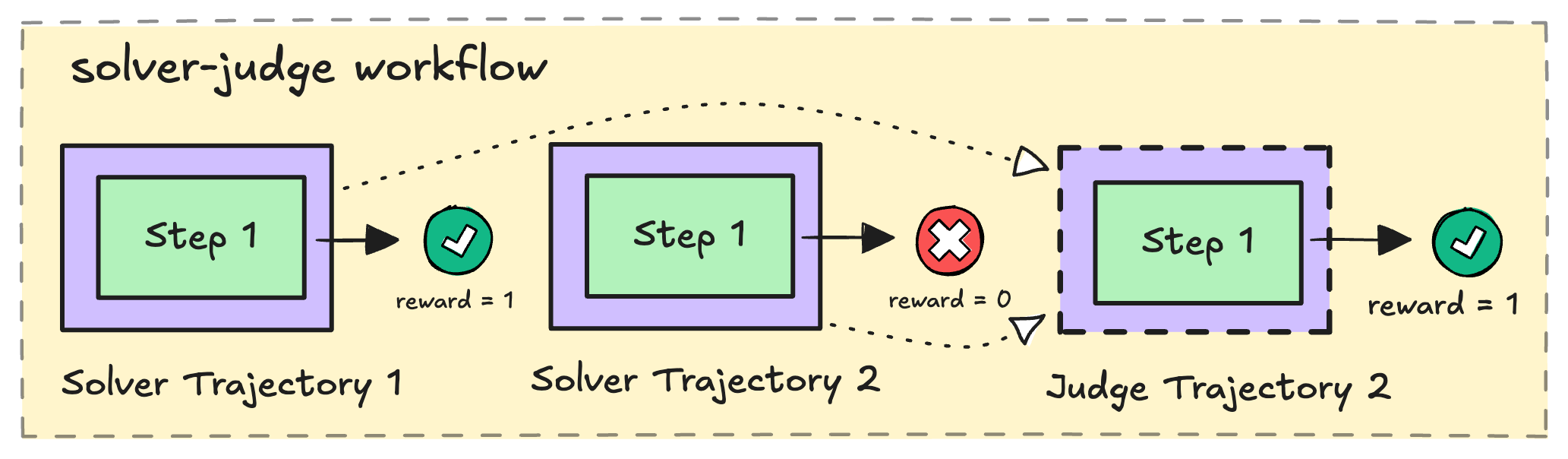
In this tutorial, you'll build a **solver-judge workflow** — a multi-agent system where
several solver agents generate candidate solutions in parallel, and a judge agent
evaluates them to select the best one. Then you'll train the entire system end-to-end
so that both the solvers and the judge improve over time.
 By the end, you'll have a working `AgentFlow`, an `Evaluator`, and a launch command
ready to go. The completed code lives at [`cookbooks/solver_judge_flow/`](https://github.com/rllm-org/rllm/tree/main/cookbooks/solver_judge_flow).
The solver-judge pattern is a classic approach to **test-time scaling** — pairing a
generator with a verifier lets the model self-improve by learning both to produce
better solutions and to recognize correct ones.
### Prerequisites
* rLLM installed (see this [guide](/installation))
* Basic familiarity with Python `asyncio` programming
* A `Tinker` API key with `export TINKER_API_KEY=` set in your environment (this tutorial uses the Tinker backend)
***
## How the solver-judge workflow works
Here's the high-level flow for a single task:
1. **Solve** — `N` solver agents each receive the problem and generate a candidate solution in parallel. Below we take `N=2` for simplicity.
2. **Judge** — A judge agent reviews all candidate solutions and selects the best one.
3. **Score** — Each solver receives a reward based on *whether its solution is correct*. The judge receives a reward based on *whether it selected a correct answer*.
4. **Return** — The flow packages everything into an `Episode` that the trainer uses to update the policy.
During training, this runs for `K` rollouts per task, producing `K × N` solver trajectories and `K` judge trajectories — giving the RL algorithm plenty of signal to learn from.
***
## A quick look at rLLM's data model
Before we start coding, let's meet the three data structures you'll be constructing in
this tutorial. Think of them as nested containers — each one wraps the level below it.
### Step — one model interaction
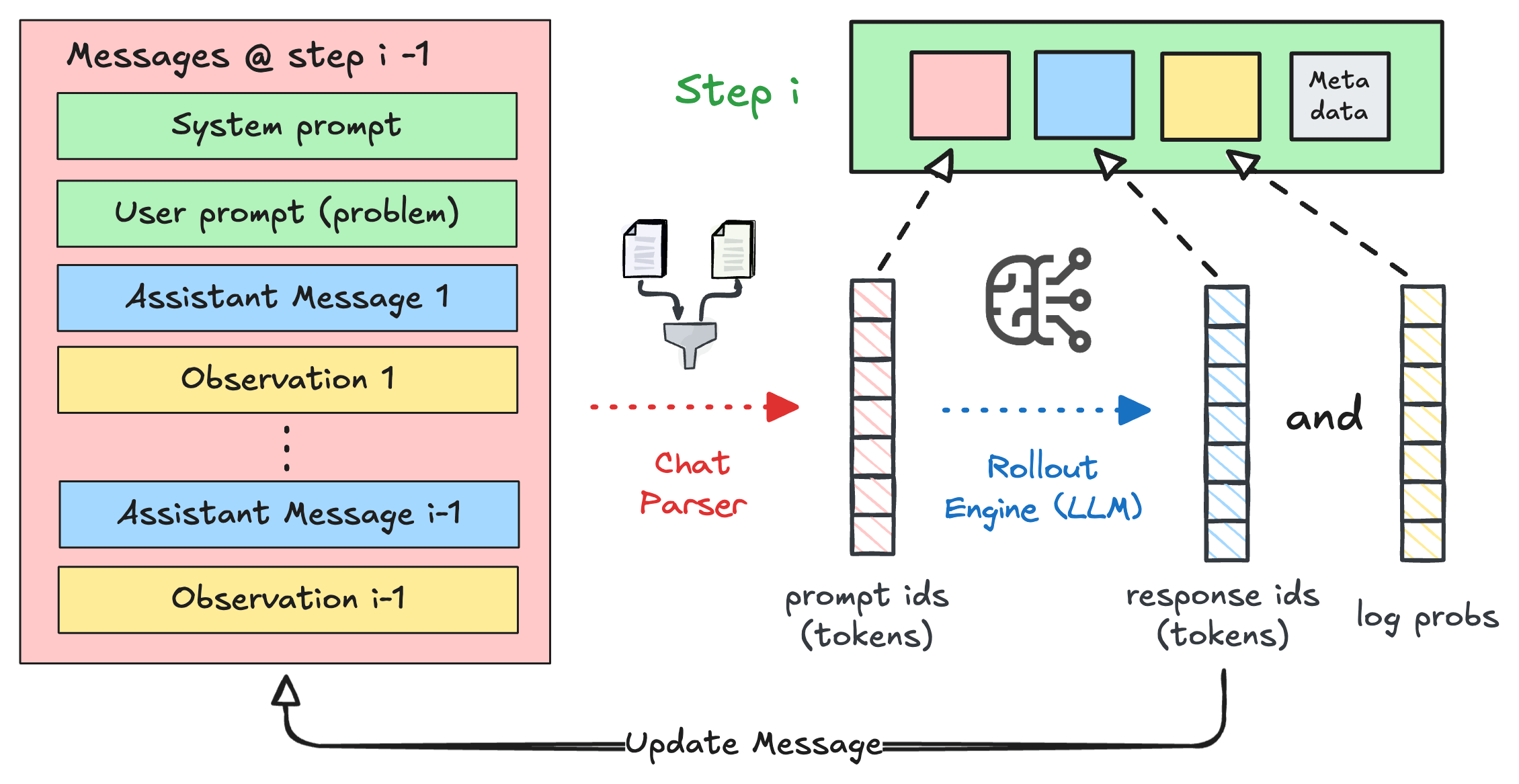
A `Step` is the atomic unit: one call to the LLM. It captures the input messages,
the generated output, and (during training) the token IDs and log-probabilities. At
runtime, it also carries the parsed `action`.
By the end, you'll have a working `AgentFlow`, an `Evaluator`, and a launch command
ready to go. The completed code lives at [`cookbooks/solver_judge_flow/`](https://github.com/rllm-org/rllm/tree/main/cookbooks/solver_judge_flow).
The solver-judge pattern is a classic approach to **test-time scaling** — pairing a
generator with a verifier lets the model self-improve by learning both to produce
better solutions and to recognize correct ones.
### Prerequisites
* rLLM installed (see this [guide](/installation))
* Basic familiarity with Python `asyncio` programming
* A `Tinker` API key with `export TINKER_API_KEY=` set in your environment (this tutorial uses the Tinker backend)
***
## How the solver-judge workflow works
Here's the high-level flow for a single task:
1. **Solve** — `N` solver agents each receive the problem and generate a candidate solution in parallel. Below we take `N=2` for simplicity.
2. **Judge** — A judge agent reviews all candidate solutions and selects the best one.
3. **Score** — Each solver receives a reward based on *whether its solution is correct*. The judge receives a reward based on *whether it selected a correct answer*.
4. **Return** — The flow packages everything into an `Episode` that the trainer uses to update the policy.
During training, this runs for `K` rollouts per task, producing `K × N` solver trajectories and `K` judge trajectories — giving the RL algorithm plenty of signal to learn from.
***
## A quick look at rLLM's data model
Before we start coding, let's meet the three data structures you'll be constructing in
this tutorial. Think of them as nested containers — each one wraps the level below it.
### Step — one model interaction
A `Step` is the atomic unit: one call to the LLM. It captures the input messages,
the generated output, and (during training) the token IDs and log-probabilities. At
runtime, it also carries the parsed `action`.
 ### Trajectory — a role's journey through the workflow
A `Trajectory` is an ordered list of `Step`s from a single role — for example, one
solver's attempt or the judge's evaluation. Each trajectory has a **name** (like
`"solver"` or `"judge"`) that tells the trainer how to group trajectories together
for advantage computation.
### Trajectory — a role's journey through the workflow
A `Trajectory` is an ordered list of `Step`s from a single role — for example, one
solver's attempt or the judge's evaluation. Each trajectory has a **name** (like
`"solver"` or `"judge"`) that tells the trainer how to group trajectories together
for advantage computation.
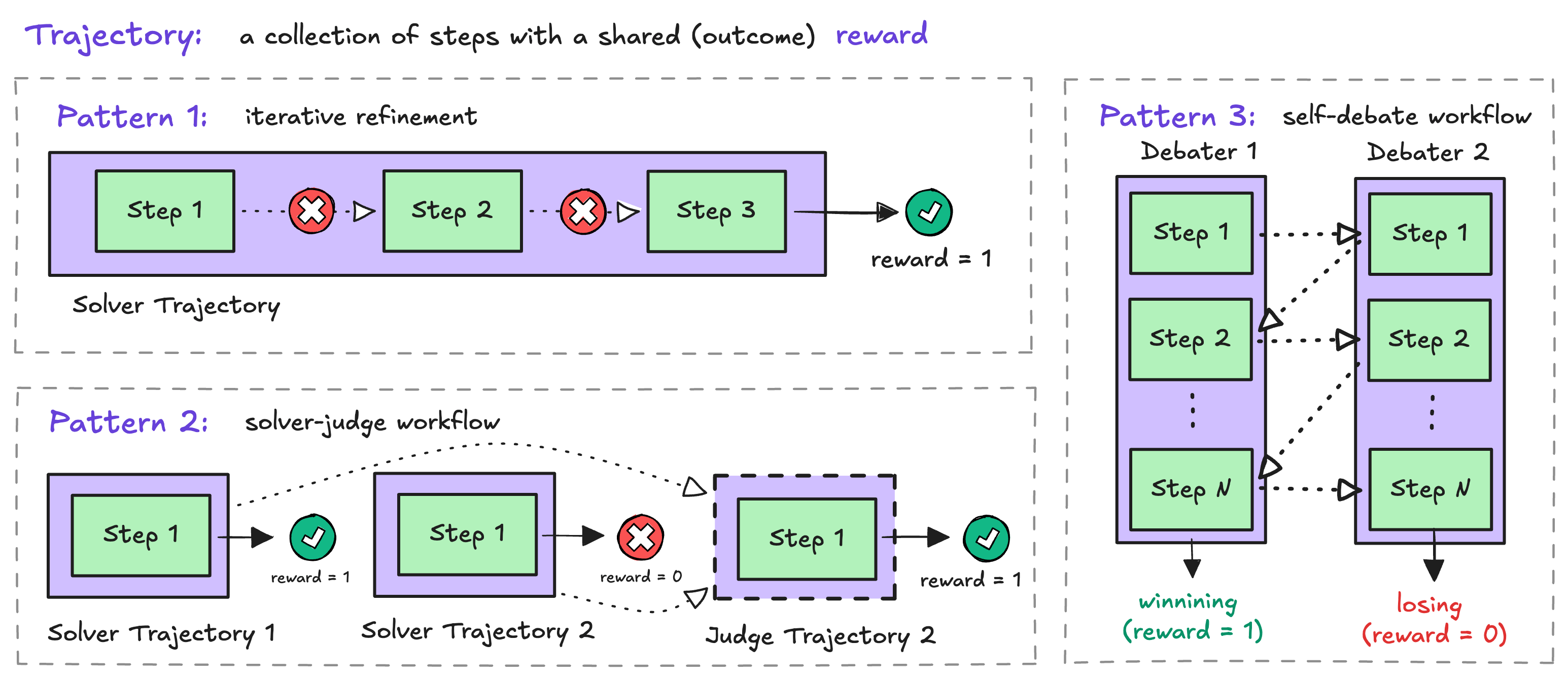 Notice **Pattern 2** in the diagram — that's exactly what we're building. Each solver
produces its own trajectory, and the judge produces one more.
### Episode — the full picture from one rollout
An `Episode` is what your `AgentFlow` returns. It bundles all the trajectories from
a single rollout execution, along with metadata like `is_correct` and any artifacts
the evaluator will consume.
Notice **Pattern 2** in the diagram — that's exactly what we're building. Each solver
produces its own trajectory, and the judge produces one more.
### Episode — the full picture from one rollout
An `Episode` is what your `AgentFlow` returns. It bundles all the trajectories from
a single rollout execution, along with metadata like `is_correct` and any artifacts
the evaluator will consume.
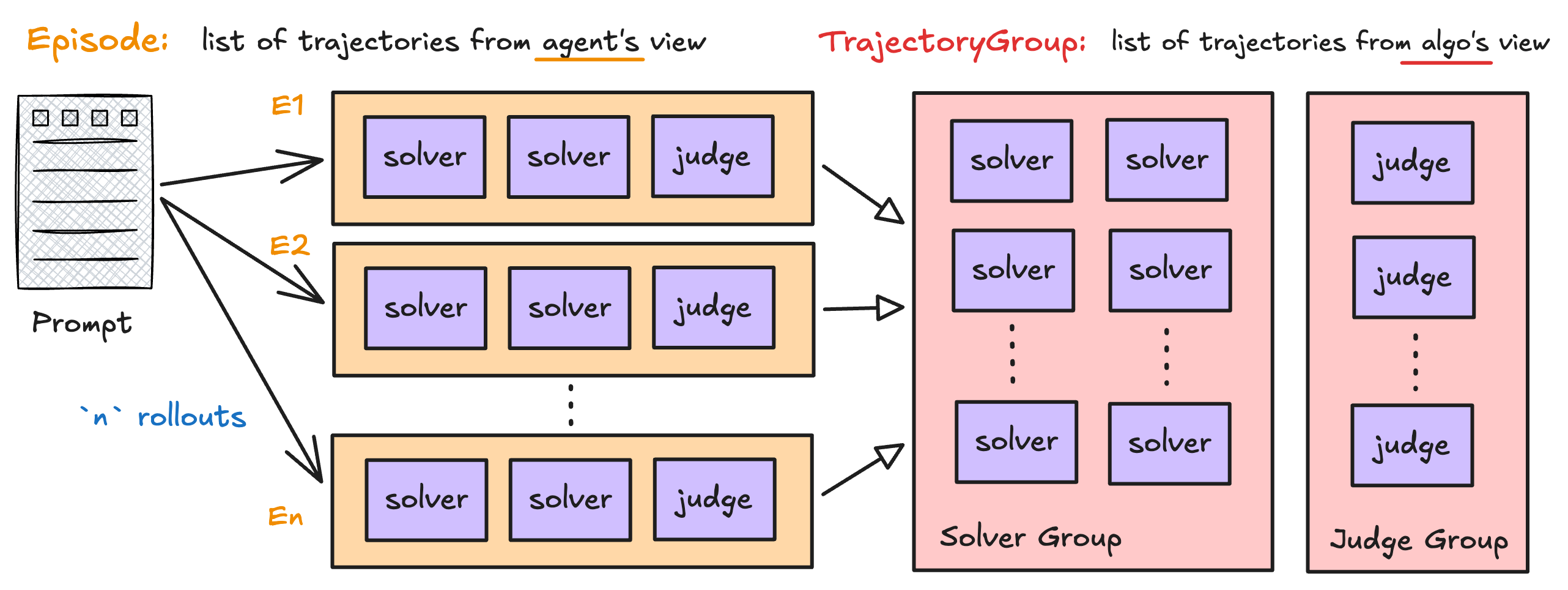 The left side of the diagram shows the **flow view** — each episode contains its
solver and judge trajectories. The right side shows the **algorithm view** — during
training, rLLM regroups trajectories by name across rollouts (e.g., all solver
trajectories for the same task go into one group). You don't need to manage this
yourself.
We'll see each of these structures come to life as we build the flow below.
***
## Building the AgentFlow
An `AgentFlow` in rLLM is just a plain async function decorated with
`@rllm.rollout(name=...)`. It takes a `Task` and an `AgentConfig`, talks to a model
via an OpenAI-compatible client, and returns an `Episode`.
The same code path runs both for evaluation and training. During training, the
`config.base_url` points at rLLM's model gateway, which transparently captures
token IDs and log-probabilities for RL optimization. Your flow code doesn't have
to change between the two modes.
The solver issues N parallel LLM calls — one per candidate solution — and wraps
each result in a `Trajectory` named `"solver"`.
```python theme={null}
import asyncio
import re
from openai import AsyncOpenAI
from rllm.types import Step, Trajectory
async def _generate_solutions(
client: AsyncOpenAI, model: str, problem: str, n: int = 2
) -> list[Trajectory]:
async def _solve() -> Trajectory:
messages = [
{
"role": "user",
"content": f"{problem}. Output the final answer within ...",
}
]
response = await client.chat.completions.create(
model=model,
messages=messages,
temperature=1,
max_tokens=1000,
)
content = response.choices[0].message.content or ""
return Trajectory(
name="solver",
steps=[
Step(
chat_completions=messages + [{"role": "assistant", "content": content}],
model_response=content,
action=_parse_answer(content),
)
],
)
return await asyncio.gather(*(_solve() for _ in range(n)))
def _parse_answer(response: str) -> str:
match = re.search(r"(.*?)", response, re.IGNORECASE | re.DOTALL)
if match:
return f"{match.group(1).strip()}"
return "No solution found"
```
A few things to notice:
* The trajectory is named `"solver"` — this name is how rLLM groups trajectories during training.
* Each `Step` captures the chat history (`chat_completions`), the raw model output (`model_response`), and the parsed answer (`action`). The token-level training data is filled in by the gateway during training.
* `_generate_solutions` launches N solvers concurrently with `asyncio.gather`, so they run in parallel.
The judge receives the problem and all candidate solutions, then returns one
trajectory named `"judge"` whose `action` is the *selected solution's content*
(resolved from the index the model outputs).
```python theme={null}
async def _judge_solutions(
client: AsyncOpenAI, model: str, problem: str, solutions: list[str]
) -> Trajectory:
prompt = _create_judge_prompt(problem, solutions)
messages = [{"role": "user", "content": prompt}]
response = await client.chat.completions.create(
model=model,
messages=messages,
temperature=1,
max_tokens=1000,
)
content = response.choices[0].message.content or ""
return Trajectory(
name="judge",
steps=[
Step(
chat_completions=messages + [{"role": "assistant", "content": content}],
model_response=content,
action=_parse_judge_response(content, solutions),
)
],
)
def _parse_judge_response(response: str, solutions: list[str]) -> str:
match = re.search(r"(.*?)", response, re.IGNORECASE | re.DOTALL)
if match:
try:
idx = int(match.group(1).strip())
return solutions[idx - 1]
except (ValueError, IndexError):
return ""
return ""
def _create_judge_prompt(problem: str, solutions: list[str]) -> str:
prompt = (
"You are an expert verifier. Given a countdown problem and multiple "
"solution attempts, select a correct solution.\n"
f"Problem:\n{problem}\nSolutions to evaluate:\n"
)
for i, solution in enumerate(solutions, 1):
prompt += f"\nSolution {i}:\n{solution}\n"
prompt += (
"\nA correct solution must satisfy the following criteria:\n"
"1. The solution uses only the given numbers.\n"
"2. Each number is used exactly once.\n"
"3. Only basic arithmetic operations (+, -, *, /) are used.\n"
"4. The calculation results in the target number.\n"
"5. The final answer is clearly marked within ... tags.\n"
"Output the index of your selected solution within ... tags, "
"e.g., 1 for the first solution. If multiple solutions are "
"correct, output the index of the first correct one."
)
return prompt
```
Same shape as the solver — one LLM call, one `Step`, one `Trajectory` — but
named `"judge"`. The judge's `action` is the *selected solution's content*
rather than an index, which makes it scoreable with the same reward function
used for solvers.
Now wrap the two helpers in a single async function decorated with
`@rllm.rollout`. This decorator marks the function as the entry point for
rLLM's rollout engine.
```python theme={null}
import rllm
from rllm.types import AgentConfig, Episode, Task
N_SOLUTIONS = 2
@rllm.rollout(name="solver-judge")
async def solver_judge_flow(task: Task, config: AgentConfig) -> Episode:
client = AsyncOpenAI(base_url=config.base_url, api_key="EMPTY")
problem = task.instruction
# 1. Solver generates N solutions in parallel.
solver_trajectories = await _generate_solutions(
client, config.model, problem, n=N_SOLUTIONS
)
# 2. Judge selects the best solution.
solutions = [t.steps[0].action for t in solver_trajectories]
judge_trajectory = await _judge_solutions(client, config.model, problem, solutions)
# 3. Bundle everything into an Episode.
selected = judge_trajectory.steps[0].action
return Episode(
trajectories=[*solver_trajectories, judge_trajectory],
artifacts={"answer": selected},
)
```
Walking through the function:
1. **Construct the OpenAI client** pointed at `config.base_url`. Same code for eval and training — only the URL changes.
2. **Solvers run in parallel** via the helper above. Result: a list of `"solver"` trajectories.
3. **Judge picks one** using the parsed solutions. Result: a single `"judge"` trajectory whose `action` is the chosen solution's content.
4. **Return an `Episode`** containing all trajectories and an `artifacts["answer"]` field that the evaluator will read.
Notice what's *not* in the flow: any reward computation. Scoring lives in the
Evaluator (next step) — keeping the two concerns separate means the same flow
can be reused with different reward functions without code changes.
***
## Building the Evaluator
The Evaluator is a second function — it reads the `Episode` produced by the flow,
sets per-trajectory rewards, and returns an `EvalOutput`. rLLM's trainer uses the
per-trajectory rewards to compute advantages separately for the `solver` and `judge`
trajectory groups.
```python theme={null}
import rllm
from rllm.eval.types import EvalOutput, Signal
from rllm.rewards.countdown_reward import compute_score
from rllm.types import Episode
@rllm.evaluator
def solver_judge_countdown_evaluator(task: dict, episode: Episode) -> EvalOutput:
"""Score solver and judge trajectories independently."""
ground_truth = {"target": task["target"], "numbers": task["nums"]}
solver_correct = 0
solver_total = 0
judge_reward = 0.0
is_correct = False
for traj in episode.trajectories:
answer = traj.steps[-1].action if traj.steps else ""
score = compute_score(str(answer), ground_truth)
reward = 1.0 if score >= 1.0 else 0.0
traj.reward = reward # per-trajectory reward — drives advantage computation
if traj.name == "solver":
solver_total += 1
solver_correct += int(reward >= 1.0)
elif traj.name == "judge":
judge_reward = reward
is_correct = reward >= 1.0
solver_acc = solver_correct / solver_total if solver_total > 0 else 0.0
return EvalOutput(
reward=judge_reward,
is_correct=is_correct,
signals=[
Signal(name="solver_acc", value=solver_acc),
Signal(name="judge_acc", value=float(is_correct)),
],
)
```
A few notes:
* The evaluator iterates over every trajectory in the episode and writes `traj.reward` directly. The trainer reads these per-trajectory rewards when grouping by name and computing advantages.
* `compute_score` is a small reward helper from `rllm.rewards.countdown_reward` that checks whether an arithmetic expression in `...` evaluates to the target number using only the allowed operations.
* The top-level `EvalOutput.reward` is the *episode-level* reward (we use the judge's score). Per-role accuracy is logged via `Signal` entries.
***
## Wiring it up as a cookbook
A **cookbook** is a small Python package that ships an `AgentFlow` plus an
`Evaluator` together with training scripts. Installing it makes both discoverable
via `rllm`'s entry-point system.
The directory layout (see [`cookbooks/solver_judge_flow/`](https://github.com/rllm-org/rllm/tree/main/cookbooks/solver_judge_flow)):
```
cookbooks/solver_judge_flow/
├── solver_judge_flow.py # the AgentFlow defined above
├── evaluator.py # the Evaluator defined above
├── pyproject.toml # entry-point declarations
├── train.py # Hydra entry point used by train_*.sh
├── train_tinker.sh # single-machine LoRA training
└── train_verl.sh # distributed multi-GPU training
```
The `pyproject.toml` registers the flow and evaluator under two well-known entry-point groups:
```toml theme={null}
[project.entry-points."rllm.agents"]
solver_judge = "solver_judge_flow:solver_judge_flow"
[project.entry-points."rllm.evaluators"]
solver_judge_countdown = "evaluator:solver_judge_countdown_evaluator"
```
After `uv pip install -e cookbooks/solver_judge_flow`, the rLLM CLI resolves
`--agent solver_judge` and `--evaluator solver_judge_countdown` directly.
See the [Cookbooks](/cookbooks/overview) tutorial for the full convention.
***
## Training
With the flow and evaluator in place, training is a thin wrapper around `AgentTrainer`.
### Writing the training script
```python theme={null}
import hydra
from evaluator import solver_judge_countdown_evaluator
from omegaconf import DictConfig
from solver_judge_flow import solver_judge_flow
from rllm.data.dataset import DatasetRegistry
from rllm.experimental.unified_trainer import AgentTrainer
@hydra.main(config_path="pkg://rllm.experimental.config", config_name="unified", version_base=None)
def main(config: DictConfig):
train_dataset = DatasetRegistry.load_dataset("countdown", "train")
test_dataset = DatasetRegistry.load_dataset("countdown", "test")
if train_dataset is None:
raise RuntimeError("countdown train split not found. Run: rllm dataset pull countdown")
trainer = AgentTrainer(
backend=config.rllm.get("backend", "tinker"),
agent_flow=solver_judge_flow,
evaluator=solver_judge_countdown_evaluator,
config=config,
train_dataset=train_dataset,
val_dataset=test_dataset,
)
trainer.train()
if __name__ == "__main__":
main()
```
What each piece does:
* **`DatasetRegistry.load_dataset`** — Loads the countdown dataset (combine the given numbers with arithmetic to reach a target). Pull it once with `rllm dataset pull countdown`.
* **`agent_flow=` / `evaluator=`** — The two functions you just wrote. The trainer drives the flow per-task, runs the evaluator on each episode, and uses the per-trajectory rewards for advantage estimation.
* **`backend="tinker"`** — Selects the Tinker backend for single-machine LoRA training. Other options include `"verl"` for distributed multi-GPU training.
### Writing the launch script
The training script uses [Hydra](https://hydra.cc/) for configuration. A shell script
keeps the override list manageable:
```bash theme={null}
#!/usr/bin/env bash
set -euo pipefail
python -u train.py \
rllm/backend=tinker \
model.name=Qwen/Qwen3-4B-Instruct-2507 \
model.lora_rank=32 \
training.group_size=8 \
data.train_batch_size=32 \
data.val_batch_size=256 \
data.max_prompt_length=4096 \
data.max_response_length=1024 \
rllm.trainer.total_epochs=1 \
rllm.trainer.test_freq=10 \
rllm.trainer.project_name=solver_judge \
rllm.trainer.experiment_name=qwen3-4b-instruct \
rllm.trainer.logger=[console,ui]
```
Key configuration groups:
| Group | Parameters | What they control |
| ------------ | -------------------------------------------------------------- | ---------------------------------------------- |
| **Model** | `model.name`, `model.lora_rank` | Base model and LoRA rank |
| **Training** | `training.group_size` | Rollouts per task (the `K` from earlier) |
| **Data** | `train_batch_size`, `max_prompt_length`, `max_response_length` | Batch size + token-length limits |
| **Trainer** | `total_epochs`, `test_freq`, `logger` | Training duration, eval cadence, logging sinks |
Run training with:
```bash theme={null}
bash cookbooks/solver_judge_flow/train_tinker.sh
```
For the verl (distributed GPU) variant, use `train_verl.sh` instead.
***
## What happens during training
With your flow and training script in place, here's what the training loop does
under the hood — tying back to the data model from earlier.
For each batch of tasks:
1. **Generate episodes** — The trainer runs `solver_judge_flow` `K` times per task. Each run produces one `Episode` containing `N` solver trajectories + 1 judge trajectory.
2. **Evaluate** — The evaluator runs on each episode, writing per-trajectory rewards onto `traj.reward`.
3. **Group trajectories** — Episodes are regrouped into `TrajectoryGroup`s by name. All solver trajectories for the same task end up in one group; all judge trajectories in another.
4. **Compute advantages** — Within each group, an advantage estimator compares trajectories. By default GRPO uses the within-group reward distribution. With `K × N` solver trajectories per task, the solver group has plenty of comparison signal; the judge group has `K` trajectories per task.
5. **Update the policy** — The shared model is updated to increase the probability of high-advantage trajectories and decrease low-advantage ones.
6. **Validate** — Periodically the trainer runs validation rollouts (without training) and reports `solver_acc` and `judge_acc` from the evaluator's `signals`.
For the full details on the training pipeline, see the [unified trainer](/experimental/unified-trainer) reference. To customize advantage estimation per role, see the [advantage estimator](/experimental/advantage-estimator) reference.
***
## Next steps
The full cookbook authoring guide and a tour of the other examples
Deep dive into the training loop architecture and 8-stage batch pipeline
Customize how advantages are computed per role
The protocol the rLLM CLI and trainer dispatch through
The left side of the diagram shows the **flow view** — each episode contains its
solver and judge trajectories. The right side shows the **algorithm view** — during
training, rLLM regroups trajectories by name across rollouts (e.g., all solver
trajectories for the same task go into one group). You don't need to manage this
yourself.
We'll see each of these structures come to life as we build the flow below.
***
## Building the AgentFlow
An `AgentFlow` in rLLM is just a plain async function decorated with
`@rllm.rollout(name=...)`. It takes a `Task` and an `AgentConfig`, talks to a model
via an OpenAI-compatible client, and returns an `Episode`.
The same code path runs both for evaluation and training. During training, the
`config.base_url` points at rLLM's model gateway, which transparently captures
token IDs and log-probabilities for RL optimization. Your flow code doesn't have
to change between the two modes.
The solver issues N parallel LLM calls — one per candidate solution — and wraps
each result in a `Trajectory` named `"solver"`.
```python theme={null}
import asyncio
import re
from openai import AsyncOpenAI
from rllm.types import Step, Trajectory
async def _generate_solutions(
client: AsyncOpenAI, model: str, problem: str, n: int = 2
) -> list[Trajectory]:
async def _solve() -> Trajectory:
messages = [
{
"role": "user",
"content": f"{problem}. Output the final answer within ...",
}
]
response = await client.chat.completions.create(
model=model,
messages=messages,
temperature=1,
max_tokens=1000,
)
content = response.choices[0].message.content or ""
return Trajectory(
name="solver",
steps=[
Step(
chat_completions=messages + [{"role": "assistant", "content": content}],
model_response=content,
action=_parse_answer(content),
)
],
)
return await asyncio.gather(*(_solve() for _ in range(n)))
def _parse_answer(response: str) -> str:
match = re.search(r"(.*?)", response, re.IGNORECASE | re.DOTALL)
if match:
return f"{match.group(1).strip()}"
return "No solution found"
```
A few things to notice:
* The trajectory is named `"solver"` — this name is how rLLM groups trajectories during training.
* Each `Step` captures the chat history (`chat_completions`), the raw model output (`model_response`), and the parsed answer (`action`). The token-level training data is filled in by the gateway during training.
* `_generate_solutions` launches N solvers concurrently with `asyncio.gather`, so they run in parallel.
The judge receives the problem and all candidate solutions, then returns one
trajectory named `"judge"` whose `action` is the *selected solution's content*
(resolved from the index the model outputs).
```python theme={null}
async def _judge_solutions(
client: AsyncOpenAI, model: str, problem: str, solutions: list[str]
) -> Trajectory:
prompt = _create_judge_prompt(problem, solutions)
messages = [{"role": "user", "content": prompt}]
response = await client.chat.completions.create(
model=model,
messages=messages,
temperature=1,
max_tokens=1000,
)
content = response.choices[0].message.content or ""
return Trajectory(
name="judge",
steps=[
Step(
chat_completions=messages + [{"role": "assistant", "content": content}],
model_response=content,
action=_parse_judge_response(content, solutions),
)
],
)
def _parse_judge_response(response: str, solutions: list[str]) -> str:
match = re.search(r"(.*?)", response, re.IGNORECASE | re.DOTALL)
if match:
try:
idx = int(match.group(1).strip())
return solutions[idx - 1]
except (ValueError, IndexError):
return ""
return ""
def _create_judge_prompt(problem: str, solutions: list[str]) -> str:
prompt = (
"You are an expert verifier. Given a countdown problem and multiple "
"solution attempts, select a correct solution.\n"
f"Problem:\n{problem}\nSolutions to evaluate:\n"
)
for i, solution in enumerate(solutions, 1):
prompt += f"\nSolution {i}:\n{solution}\n"
prompt += (
"\nA correct solution must satisfy the following criteria:\n"
"1. The solution uses only the given numbers.\n"
"2. Each number is used exactly once.\n"
"3. Only basic arithmetic operations (+, -, *, /) are used.\n"
"4. The calculation results in the target number.\n"
"5. The final answer is clearly marked within ... tags.\n"
"Output the index of your selected solution within ... tags, "
"e.g., 1 for the first solution. If multiple solutions are "
"correct, output the index of the first correct one."
)
return prompt
```
Same shape as the solver — one LLM call, one `Step`, one `Trajectory` — but
named `"judge"`. The judge's `action` is the *selected solution's content*
rather than an index, which makes it scoreable with the same reward function
used for solvers.
Now wrap the two helpers in a single async function decorated with
`@rllm.rollout`. This decorator marks the function as the entry point for
rLLM's rollout engine.
```python theme={null}
import rllm
from rllm.types import AgentConfig, Episode, Task
N_SOLUTIONS = 2
@rllm.rollout(name="solver-judge")
async def solver_judge_flow(task: Task, config: AgentConfig) -> Episode:
client = AsyncOpenAI(base_url=config.base_url, api_key="EMPTY")
problem = task.instruction
# 1. Solver generates N solutions in parallel.
solver_trajectories = await _generate_solutions(
client, config.model, problem, n=N_SOLUTIONS
)
# 2. Judge selects the best solution.
solutions = [t.steps[0].action for t in solver_trajectories]
judge_trajectory = await _judge_solutions(client, config.model, problem, solutions)
# 3. Bundle everything into an Episode.
selected = judge_trajectory.steps[0].action
return Episode(
trajectories=[*solver_trajectories, judge_trajectory],
artifacts={"answer": selected},
)
```
Walking through the function:
1. **Construct the OpenAI client** pointed at `config.base_url`. Same code for eval and training — only the URL changes.
2. **Solvers run in parallel** via the helper above. Result: a list of `"solver"` trajectories.
3. **Judge picks one** using the parsed solutions. Result: a single `"judge"` trajectory whose `action` is the chosen solution's content.
4. **Return an `Episode`** containing all trajectories and an `artifacts["answer"]` field that the evaluator will read.
Notice what's *not* in the flow: any reward computation. Scoring lives in the
Evaluator (next step) — keeping the two concerns separate means the same flow
can be reused with different reward functions without code changes.
***
## Building the Evaluator
The Evaluator is a second function — it reads the `Episode` produced by the flow,
sets per-trajectory rewards, and returns an `EvalOutput`. rLLM's trainer uses the
per-trajectory rewards to compute advantages separately for the `solver` and `judge`
trajectory groups.
```python theme={null}
import rllm
from rllm.eval.types import EvalOutput, Signal
from rllm.rewards.countdown_reward import compute_score
from rllm.types import Episode
@rllm.evaluator
def solver_judge_countdown_evaluator(task: dict, episode: Episode) -> EvalOutput:
"""Score solver and judge trajectories independently."""
ground_truth = {"target": task["target"], "numbers": task["nums"]}
solver_correct = 0
solver_total = 0
judge_reward = 0.0
is_correct = False
for traj in episode.trajectories:
answer = traj.steps[-1].action if traj.steps else ""
score = compute_score(str(answer), ground_truth)
reward = 1.0 if score >= 1.0 else 0.0
traj.reward = reward # per-trajectory reward — drives advantage computation
if traj.name == "solver":
solver_total += 1
solver_correct += int(reward >= 1.0)
elif traj.name == "judge":
judge_reward = reward
is_correct = reward >= 1.0
solver_acc = solver_correct / solver_total if solver_total > 0 else 0.0
return EvalOutput(
reward=judge_reward,
is_correct=is_correct,
signals=[
Signal(name="solver_acc", value=solver_acc),
Signal(name="judge_acc", value=float(is_correct)),
],
)
```
A few notes:
* The evaluator iterates over every trajectory in the episode and writes `traj.reward` directly. The trainer reads these per-trajectory rewards when grouping by name and computing advantages.
* `compute_score` is a small reward helper from `rllm.rewards.countdown_reward` that checks whether an arithmetic expression in `...` evaluates to the target number using only the allowed operations.
* The top-level `EvalOutput.reward` is the *episode-level* reward (we use the judge's score). Per-role accuracy is logged via `Signal` entries.
***
## Wiring it up as a cookbook
A **cookbook** is a small Python package that ships an `AgentFlow` plus an
`Evaluator` together with training scripts. Installing it makes both discoverable
via `rllm`'s entry-point system.
The directory layout (see [`cookbooks/solver_judge_flow/`](https://github.com/rllm-org/rllm/tree/main/cookbooks/solver_judge_flow)):
```
cookbooks/solver_judge_flow/
├── solver_judge_flow.py # the AgentFlow defined above
├── evaluator.py # the Evaluator defined above
├── pyproject.toml # entry-point declarations
├── train.py # Hydra entry point used by train_*.sh
├── train_tinker.sh # single-machine LoRA training
└── train_verl.sh # distributed multi-GPU training
```
The `pyproject.toml` registers the flow and evaluator under two well-known entry-point groups:
```toml theme={null}
[project.entry-points."rllm.agents"]
solver_judge = "solver_judge_flow:solver_judge_flow"
[project.entry-points."rllm.evaluators"]
solver_judge_countdown = "evaluator:solver_judge_countdown_evaluator"
```
After `uv pip install -e cookbooks/solver_judge_flow`, the rLLM CLI resolves
`--agent solver_judge` and `--evaluator solver_judge_countdown` directly.
See the [Cookbooks](/cookbooks/overview) tutorial for the full convention.
***
## Training
With the flow and evaluator in place, training is a thin wrapper around `AgentTrainer`.
### Writing the training script
```python theme={null}
import hydra
from evaluator import solver_judge_countdown_evaluator
from omegaconf import DictConfig
from solver_judge_flow import solver_judge_flow
from rllm.data.dataset import DatasetRegistry
from rllm.experimental.unified_trainer import AgentTrainer
@hydra.main(config_path="pkg://rllm.experimental.config", config_name="unified", version_base=None)
def main(config: DictConfig):
train_dataset = DatasetRegistry.load_dataset("countdown", "train")
test_dataset = DatasetRegistry.load_dataset("countdown", "test")
if train_dataset is None:
raise RuntimeError("countdown train split not found. Run: rllm dataset pull countdown")
trainer = AgentTrainer(
backend=config.rllm.get("backend", "tinker"),
agent_flow=solver_judge_flow,
evaluator=solver_judge_countdown_evaluator,
config=config,
train_dataset=train_dataset,
val_dataset=test_dataset,
)
trainer.train()
if __name__ == "__main__":
main()
```
What each piece does:
* **`DatasetRegistry.load_dataset`** — Loads the countdown dataset (combine the given numbers with arithmetic to reach a target). Pull it once with `rllm dataset pull countdown`.
* **`agent_flow=` / `evaluator=`** — The two functions you just wrote. The trainer drives the flow per-task, runs the evaluator on each episode, and uses the per-trajectory rewards for advantage estimation.
* **`backend="tinker"`** — Selects the Tinker backend for single-machine LoRA training. Other options include `"verl"` for distributed multi-GPU training.
### Writing the launch script
The training script uses [Hydra](https://hydra.cc/) for configuration. A shell script
keeps the override list manageable:
```bash theme={null}
#!/usr/bin/env bash
set -euo pipefail
python -u train.py \
rllm/backend=tinker \
model.name=Qwen/Qwen3-4B-Instruct-2507 \
model.lora_rank=32 \
training.group_size=8 \
data.train_batch_size=32 \
data.val_batch_size=256 \
data.max_prompt_length=4096 \
data.max_response_length=1024 \
rllm.trainer.total_epochs=1 \
rllm.trainer.test_freq=10 \
rllm.trainer.project_name=solver_judge \
rllm.trainer.experiment_name=qwen3-4b-instruct \
rllm.trainer.logger=[console,ui]
```
Key configuration groups:
| Group | Parameters | What they control |
| ------------ | -------------------------------------------------------------- | ---------------------------------------------- |
| **Model** | `model.name`, `model.lora_rank` | Base model and LoRA rank |
| **Training** | `training.group_size` | Rollouts per task (the `K` from earlier) |
| **Data** | `train_batch_size`, `max_prompt_length`, `max_response_length` | Batch size + token-length limits |
| **Trainer** | `total_epochs`, `test_freq`, `logger` | Training duration, eval cadence, logging sinks |
Run training with:
```bash theme={null}
bash cookbooks/solver_judge_flow/train_tinker.sh
```
For the verl (distributed GPU) variant, use `train_verl.sh` instead.
***
## What happens during training
With your flow and training script in place, here's what the training loop does
under the hood — tying back to the data model from earlier.
For each batch of tasks:
1. **Generate episodes** — The trainer runs `solver_judge_flow` `K` times per task. Each run produces one `Episode` containing `N` solver trajectories + 1 judge trajectory.
2. **Evaluate** — The evaluator runs on each episode, writing per-trajectory rewards onto `traj.reward`.
3. **Group trajectories** — Episodes are regrouped into `TrajectoryGroup`s by name. All solver trajectories for the same task end up in one group; all judge trajectories in another.
4. **Compute advantages** — Within each group, an advantage estimator compares trajectories. By default GRPO uses the within-group reward distribution. With `K × N` solver trajectories per task, the solver group has plenty of comparison signal; the judge group has `K` trajectories per task.
5. **Update the policy** — The shared model is updated to increase the probability of high-advantage trajectories and decrease low-advantage ones.
6. **Validate** — Periodically the trainer runs validation rollouts (without training) and reports `solver_acc` and `judge_acc` from the evaluator's `signals`.
For the full details on the training pipeline, see the [unified trainer](/experimental/unified-trainer) reference. To customize advantage estimation per role, see the [advantage estimator](/experimental/advantage-estimator) reference.
***
## Next steps
The full cookbook authoring guide and a tour of the other examples
Deep dive into the training loop architecture and 8-stage batch pipeline
Customize how advantages are computed per role
The protocol the rLLM CLI and trainer dispatch through